Friday, January 6, 2012

Fixing problems with Unknown Devices

Ok, so you reinstalled your OS and some of the devices are unknown in the Device Manager (Right Click My Computer > Manage > Device Manager). This is common for older OS (XP, Vista), Windows 7 gets drivers pretty nicely, but sometimes some of the devices need specific drivers. If you misplaced your driver cd, or have no idea what device is that - no problem, we have  www.devid.info for that.
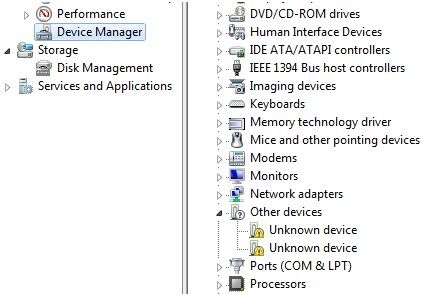
Device Manager with Unknown Devices

Right Click on an Unknown Device and select Properties. In the Details tab select Hardware Ids from a drop down list. You will see a list of hardware identification codes. Right Click on longest of them and click Copy.
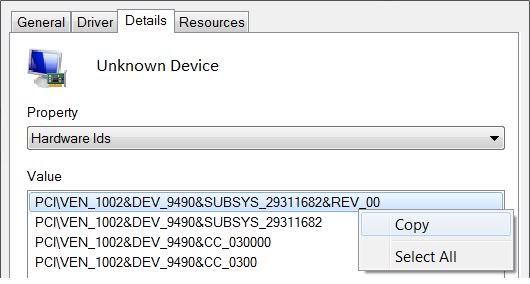
Hardware Ids

When you have copied the Id, go to devid.info, paste it in the search box ant hit search. It will give you the name of the device and various options to download, depending on your OS, architecture and drivers date (It's best to install newest drivers).

Search results

Simple as that, you found your missing drivers in just about 2 minutes, and are ready to install them! Of course it is possible that you won't find drivers for very specific or outdated device, but if you will find it somewhere else, be sure to share it with the rest of the world - devid has an upload option. This site saves time and makes driver search so much less pain, hope you like it!

Useful link: http://pixlr.com

Need some advanced image adjustments but there's no software like PhotoShop around? No problem! http://pixlr.com has everything that you need. It is a free online photo editing software that has one major advantage comparing to other online editors. Yes, it is able to use Layers. It's layout is very similar to Abobe PhotoShop, so you will have no problem using it. Just in case you do, there are some very nice video tutorials ready to help you out:

ictpublish tutorials: link
youtube channel: link

Pixlr editor

But wait, it gets better. Pixlr has few other modes, not just the editor. One of them is http://pixlr.com/express/. It has a lot of pre-made effects, so if you need just a little basic editing on your photo this is the way to go.

Pixlr express

One more fun tool is Pixlr-o-Matic - http://pixlr.com/o-matic/. It consists of three steps, in each step you can apply various effects by single click, what makes it lightning fast.

Before

After

Give this tool a try, it is simple, fast, powerful and free. What can be better? :)

Thursday, January 5, 2012

Greetings fellow PC users!

Greetings fellow PC users! This blog is aimed mostly at novice PC users. Here you will find guides, tips and tricks, tutorials and other useful stuff that will help when you are having trouble with your software / hardware or just want to learn something handy. Enjoy!